
Traditional blockchain wallets require users to manage private keys — a major barrier to mainstream adoption. Lost keys mean lost funds, and many security incidents originate from poor key-handling practices.
In this article, we demonstrate how to build a smart wallet powered by passkeys (WebAuthn) for authentication and transaction signing on the Stellar/Soroban blockchain. By leveraging biometric authentication (Touch ID, Face ID, Windows Hello), we enable a seamless and secure user experience — without user-managed private keys.
Cryptographic key material still exists, but is generated, stored, and used exclusively inside the authenticator’s secure hardware and never exposed to the user or backend.
This article is aimed at developers already familiar with at least one of the following:
- WebAuthn / Passkeys
- Smart contracts
- Stellar / Soroban (at a conceptual level)
It is not a beginner tutorial, but a technical walkthrough of an existing implementation, focusing on:
- Architecture decisions
- Security trade-offs
- How WebAuthn and Soroban are wired together in practice
A runnable PoC (Proof-of-Concept) is provided in the repository for those who want to explore the code further. The complete PoC is available on GitHub.
Prerequisites & project setup
1. Problem and Goal
The main goal of this architecture is to create a smart wallet that:
- Eliminates Private Keys: The user never interacts with or stores a private key. Authentication and signatures are handled by a Passkey (WebAuthn), which uses the device’s secure hardware.
- Delegates Signature: The smart wallet contract is ultimately responsible for verifying the WebAuthn signature and authorizing transactions on Soroban.
- Ensures Secure Recovery: A recovery mechanism controlled by the backend allows Passkey rotation in case of lost access.
Threat Model (At a Glance)
This PoC assumes a semi-trusted backend that sponsors fees and controls recovery. Attackers are assumed to have network access but not control of the user device’s secure enclave. Compromise of the backend recovery key is considered catastrophic and intentionally highlighted as a non-production trade-off. This helps security reviewers instantly calibrate their reading.
2. High-Level Architecture
The PoC is divided into three main components, coordinated by the WebAuthn flow:
| Component | Description |
| Backend | Express.js API for WebAuthn and Soroban interactions. |
| Web | React frontend for wallet operations. |
| Contracts | Soroban smart contracts (Factory + Smart Wallet). |
TL;DR Architecture Summary
- Users never see or manage private keys
- Passkeys sign WebAuthn challenges
- Challenges are bound to Soroban transactions
- Smart contracts verify signatures on-chain
- Backend sponsors fees and enables recovery
Before diving into the individual flows, it’s useful to understand the common authorization pattern shared by wallet creation, transfers, and recovery:
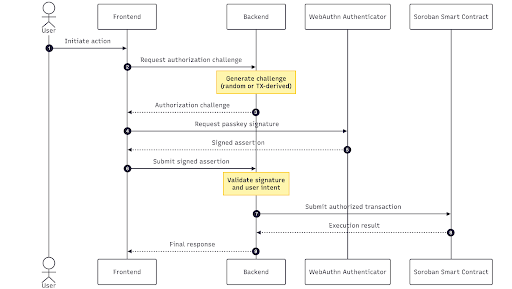
All user actions follow the same pattern: a backend-generated challenge is signed via WebAuthn and later used to authorize a Soroban transaction.
Real-World Usage
The authorization model presented here is not theoretical. The same core architecture — passkey-based authorization bound to Soroban transactions — is used in production in Meridian Pay. This proof of concept intentionally simplifies certain aspects (such as recovery and fee sponsoring) to focus on the core design.
Read more: Building a Global Non-Custodial Wallet on Stellar for Cross-Border Payments.
Arrow button
Component Responsibilities
Backend (API Server)
- Generates and validates WebAuthn challenges
- Stores user and passkey data (SQLite)
- Interacts with Soroban RPC
- Sponsors transaction fees
Web (Frontend)
- Wallet UI
- Initiates WebAuthn browser flows
- Communicates with backend
Smart Contracts
- Factory Contract: Deploys wallets with deterministic addresses
- Smart Wallet Contract: Verifies WebAuthn signatures and supports signer rotation
3. Core Design Decisions
This architecture was built based on specific design decisions to integrate WebAuthn and Soroban:
- Cryptographic Authentication (Passkeys): Instead of using External Owned Account (EOA) keys or traditional Stellar key pairs, we use Passkeys that leverage cryptographic curves supported by Soroban (like ES256/secp256r1) for on-chain signatures.
- Fee Sponsoring: The OPEX_WALLET in the backend pays all transaction fees (Gas Abstraction) to provide a frictionless user experience.
- Centralized Recovery Account (PoC): For the proof-of-concept, the backend controls a
RECOVERY_WALLET
that is configured as a backup signer. This allows Passkey rotation in case of loss, but is a security consideration (see Security & Trust Model).
⚠️ This PoC intentionally centralizes some responsibilities (fee sponsoring and recovery) to simplify UX. These trade-offs are discussed in detail in the Security & Trust Model section.
Why WebAuthn Requires a Two-Endpoint Backend
The WebAuthn protocol requires a challenge–response model to ensure security. This leads to a two-endpoint pattern for any operation requiring authentication:
- Options Endpoints: The server generates and stores a cryptographic challenge that is sent to the client.
- Action Endpoints: The client sends the cryptographic response (signed by the Passkey) back to the server, which validates it against the stored challenge.
This split guarantees:
- Server-generated challenges: Prevents replay attacks.
- Challenge storage: The server must store the challenge to validate the response.
- Response validation: Cryptographic verification must happen server-side.
| Pattern | Options Endpoint | Action Endpoint |
| Wallet Creation | GET /api/create-wallet-options/:email | POST /api/create-wallet |
| Transfer | GET /api/transfer-options | POST /api/transfer |
| Sign In | GET /api/sign-in-options/:email | POST /api/sign-in |
| Wallet Recovery | GET /api/recover-wallet-options/:email | POST /api/recover-wallet |
4. Core Flows
Wallet Creation Flow
Wallet creation is the only moment where a new cryptographic identity is introduced into the system. From this point on, the Passkey becomes the wallet’s primary signer, fundamentally shifting wallet ownership away from a private key.
Wallet creation uses the WebAuthn registration flow to create a new Passkey and deploy the Smart Wallet.
Read more: Custodial vs. Non-Custodial Wallets: Key Differences and How to Choose
Overview (Three Steps)
- The Backend generates registration options with a random challenge and stores it.
- The Frontend uses these options to initiate Passkey creation in the browser (triggering the biometric prompt).
- The Backend validates the response, stores the Passkey credentials in the DB, and deploys the Smart Wallet on Soroban via the Factory Contract.
Key Code: Generating Options (Backend)
The core of the registration is to generate a random challenge (for session authentication) and configure the Passkey to use the ES256 algorithm (supported by Soroban) and require userVerification (biometric/PIN).
// apps/backend/src/helpers/webauthn/registration/index.ts

async generateOptions(input: WebAuthnRegistrationGenerateOptionsInput): Promise<string> {
  // ... (setup code)

  const challenge = this.webauthnChallengeService.createChallenge();

  const options = await generateRegistrationOptions({
    // ... (rpName, rpID, userID, userName, userDisplayName)
    challenge: challenge,
    supportedAlgorithmIDs: [-7], // ES256 (secp256r1) which Soroban supports natively
    attestationType: "none",
    // ... (excludeCredentials, timeout)
    authenticatorSelection: {
      authenticatorAttachment: "platform",
      residentKey: "preferred",
      userVerification: "required", // Ensures biometric/PIN authentication
    },
  });

  // Store challenge linked to user identifier for later validation
  this.webauthnChallengeService.storeChallenge(identifier, options.challenge);

  return JSON.stringify(options);
} Code language: JavaScript (javascript)
Key Code: Validation and Deployment (Backend)
After successful Passkey validation, the backend derives a deterministic salt and calls the
deploy
method of the Factory Contract, passing the new Passkey’s public key as the initial signer and the
RECOVERY_WALLET
‘s public key.
// apps/backend/src/api/create-wallet.ts

async handle(payload: { email: string; registrationResponseJSON: string }) {
  // 1. Verify challenge resolution & create user/store passkey (similar to previous steps)
  // ...

  // 3. Derive deterministic salt from email
  // ...

  // 4. Deploy smart wallet via factory
  const args: xdr.ScVal[] = [
    ScConvert.bufferToScVal(hashedSalt),
    ScConvert.addressToScVal(this.recoveryWalletPublicKey),
    ScConvert.hexPublicKeyToScVal(newPasskey.credentialHexPublicKey),
  ];

  const { tx } = await this.sorobanService.simulateContractOperation({
    contractId: this.factoryContractId,
    method: "deploy",
    args,
  });

  // 5. Compute and store wallet address (remaining steps)
  // ...
}
Code language: JavaScript (javascript)
Binding Passkey Signatures to On-Chain Transactions (Transfer Flow)
The transfer flow uses WebAuthn authentication to sign a blockchain transaction.
Critical Difference: TX-Derived Challenge
WebAuthn is used here to authorize a specific action (the transfer), not just to authenticate a session. That’s why the WebAuthn challenge cannot be random.
- CRITICAL: The challenge must be derived from the Soroban transaction simulation. This ensures the Passkey signature is bound to the exact transaction being authorized.
Key Code: Challenge Generation (Backend)
The important part here is not the Soroban boilerplate, but how the WebAuthn challenge is generated and attached to the transaction. The transaction simulation is performed first to obtain data that will be used to generate the WebAuthn challenge.
// apps/backend/src/api/transfer-options.ts

async handle(payload: { fromWalletAddress: string; toWalletAddress: string; amount: number }) {
  // 1. Build transfer transaction args & simulate the transaction
  // ...

  // 3. Generate challenge from TX simulation (CRITICAL!)
  const challenge = await this.sorobanService.generateWebAuthnChallenge({
    contractId: this.nativeTokenContractId,
    simulationResponse,
    signer: { addressId: user.walletContractAddress! },
  });

  // 4. Generate authentication options with TX-linked challenge
  const options = await this.webauthnAuthenticationHelper.generateOptions({
    // ...
    customChallenge: challenge, // The TX-derived challenge is passed here
    // ...
  });

  return { options_json: options };
}
Code language: JavaScript (javascript)
Key Code: Validation and Submission (Backend)
After successful authentication (the Passkey signature), the backend attaches this WebAuthn signature to the Soroban transaction as an authorization entry (Auth Entry) and submits it to the network.
// apps/backend/src/api/transfer.ts

async handle(payload: { /* ... */ }) {
  // 1. Verify authentication challenge (successful validation guarantees the signature is valid for the TX-derived challenge)
  const verifyAuth = await this.webauthnAuthenticationHelper.complete({ /* ... */ });

  // 2. Retrieve TX metadata stored during options generation
  // ...

  // 3. Build contract signer with passkey signature
  const passkeySigner: ContractSigner = {
    addressId: user.walletContractAddress!,
    methodOptions: {
      method: "webauthn",
      options: {
        clientDataJSON: verifyAuth.clientDataJSON,
        authenticatorData: verifyAuth.authenticatorData,
        signature: verifyAuth.compactSignature,
      },
    },
  };

  // 4. Sign auth entries with passkey signature
  const tx = await this.sorobanService.signAuthEntries({
    contractId: this.nativeTokenContractId,
    tx: customMetadata.tx,
    simulationResponse: customMetadata.simulationResponse,
    signers: [passkeySigner], // The Passkey signature is attached here
  });

  // 5. Re-simulate, prepare, sign with source account, and submit
  // ...
} Code language: JavaScript (javascript)
Sign-In Flow Off-Chain
The sign-in flow authenticates users using their existing Passkeys without any on-chain interaction. This is purely for session authentication, unlike the Transfer flow, which authorizes a specific transaction.
Flow Comparison
| Aspect | Sign-In | Transfer |
| Challenge | Random server-generated | TX-derived |
| On-chain | No | Yes |
| Purpose | Session auth | TX authorization |
Implementation
The Sign-In flow reuses the same WebAuthn authentication helper (webauthnAuthenticationHelper) used for transfers, but with a random challenge (standard type) instead of a transaction-derived one.
Read more: The Role of User Experience in Blockchain and Web3 Adoption
Wallet Recovery Flow
The recovery flow enables users who have lost access to their original Passkey to regain wallet control by registering a new Passkey via the Recovery Account.
How Recovery Works
- The wallet stores two signers: the user’s Passkey and the Recovery Account.
- The Recovery Account (controlled by the backend) is authorized to call the
rotate_signer
method on the wallet contract.
Flow Comparison
| Aspect | Wallet Creation | Wallet Recovery |
| WebAuthn Flow | Registration | Registration |
| On-chain Action | Deploy contract | Rotate signer |
| Signer | User’s passkey | Recovery account |
Smart Contract: rotate_signer
The critical constraint is the check that only the configured recovery account can call the method.
// contracts/smart-wallet/src/lib.rs

impl Recovery for AccountContract {
    fn rotate_signer(env: Env, new_signer: BytesN<65>) -> Result<(), RecoveryError> {
        // Only the recovery account can call this method
        let recovery = env
            // ...
        recovery.require_auth();

        // Replace the signer with the new passkey public key
        env.storage().instance().set(&DataKey::Signer, &new_signer);

        Ok(())
    }
}
Code language: JavaScript (javascript)
Key Code: Signer Rotation (Backend)
The backend validates the new Passkey created by the user, and then uses the secret key of the recovery account (RECOVERY_WALLET_SECRET_KEY) to sign and submit the rotate_signer transaction.
// apps/backend/src/api/recover-wallet.ts

async handle(payload: { email: string; registrationResponseJSON: string }) {
  // 1. Validate new passkey registration & Store the new passkey in the database
  // ...

  // 3. Prepare rotate_signer transaction
  const args: xdr.ScVal[] = [
    ScConvert.hexPublicKeyToScVal(newPasskey.credentialHexPublicKey),
  ];

  // 4. Recovery account signs the transaction (not the user!)
  const signers: ContractSigner[] = [
    {
      addressId: this.recoveryWalletKeypair.publicKey(),
      methodOptions: {
        method: "keypair",
        options: {
          secret: this.recoveryWalletKeypair.secret(),
        },
      },
    },
  ];

  // 5. Simulate and execute the transaction
  const { tx } = await this.sorobanService.simulateContractOperation({
    contractId: user.walletContractAddress, // Call the user's wallet contract
    method: "rotate_signer",
    args,
    signers,
  });

  // ... (remaining steps for preparing/signing/sending TX)
}
Code language: JavaScript (javascript)
5. Security & Trust Model
| Aspect | Implication |
| Recovery account is centralized | The backend controls the recovery key. In production, consider multi-sig or time-locked recovery. |
| User identity verification | This PoC only requires email. Production systems should add additional verification (KYC, security questions, etc.). |
| Old passkey invalidation | Once rotated, the old passkey cannot sign transactions, preventing malicious use of compromised credentials. |
Security Guarantees
- Passkey security: Private key never leaves the user’s device.
- Biometric verification: User presence is required for each operation.
- Challenge binding: Signatures are tied to specific operations (TX-derived challenge).
- On-chain verification: The Smart Contract validates WebAuthn signatures.
6. Running and Extending the PoC (Optional)
PoC Installation and Setup
This section contains all the prerequisites and configurations to run the project locally.
Requirements
For Node.js Applications
- Node.js 24 LTS or higher
- npm 10.x or higher
For Smart Contracts
- Rust (via rustup)
- Stellar CLI
Project structure
soroban-smart-wallet-poc/

├── apps/
│   ├── backend/      # Express.js API server
│   └── web/          # React frontend
├── contracts/
│   ├── factory/      # Wallet factory contract
│   └── smart-wallet/ # WebAuthn-enabled smart wallet
Code language: PHP (php)
Installation
# Clone repository
git clone https://github.com/CheesecakeLabs/soroban-smart-wallet-poc
cd soroban-smart-wallet-poc

# Install dependencies
npm installCode language: PHP (php)
Smart Contract Deployment
Step 1: Deploy the Smart Wallet Contract
The smart wallet contract must be deployed first as the factory requires its WASM hash.
- Configure the
SOURCE_ACCOUNT
under
contracts/smart-wallet/
to be the recovery account. - Execute the build and upload:
cd contracts/smart-wallet
# Build the contract
make build
# Upload the WASM to the network
make uploadCode language: PHP (php)
Important: Note the returned WASM hash.
Step 2: Deploy the Factory Contract
In
contracts/factory/
, update the
SOURCE_ACCOUNT
and the
WASM_HASH
(from the previous step) in the
Makefile
Execute the build and deploy:
cd contracts/factory
# Build the factory contract
make build
# Deploy to the network
make deployCode language: PHP (php)
Important: Note the returned
contract_id
for backend configuration.
Step 3: Configure Backend Environment
Create the
.env
file in
apps/backend/
and fill in the contract IDs and secret keys (for testing):
# Server Configuration
PORT=3000

# WebAuthn Configuration
WEBAUTHN_RP_NAME="Soroban Smart Wallet POC"
WEBAUTHN_RP_ORIGIN="http://localhost:5173"

# Stellar/Soroban Configuration
STELLAR_RPC_URL="https://soroban-testnet.stellar.org"
STELLAR_NETWORK_PASSPHRASE="Test SDF Network ; September 2015"
STELLAR_MAX_FEE="10000000"

# Contract Configuration
WALLET_FACTORY_CONTRACT_ID="C..."  # Factory contract ID from deployment
NATIVE_TOKEN_CONTRACT_ID="CDLZFC3SYJYDZT7K67VZ75HPJVIEUVNIXF47ZG2FB2RMQQVU2HHGCYSC"

# Wallet Configuration
OPEX_WALLET_SECRET_KEY="S..."       # Sponsors fees and funds wallets (must be funded)
RECOVERY_WALLET_SECRET_KEY="S..."   # Recovery account secret key (starts with S)
Code language: PHP (php)| Variable | Description |
| WALLET_FACTORY_CONTRACT_ID | The deployed factory contract address |
| OPEX_WALLET_SECRET_KEY | The secret key of the wallet that sponsors transaction fees and funds new wallets. Must be a funded testnet wallet |
| RECOVERY_WALLET_SECRET_KEY | Secret key, its public key is set as recovery signer on new wallets. Enables passkey rotation for lost access |
Additional Features
The PoC includes additional features:
- Fund Wallet
- POST /api/fund-wallet
- Transfers testnet XLM from the operations wallet to newly created wallets.
- Get Balance
- GET /api/balance?wallet_address=C…
- Retrieves the native token balance for a wallet.
What’s Next?
- Session management by Tokens – Enhances system security
- Multi-passkey support – Allow multiple devices per wallet
- Decentralized recovery – Replace centralized recovery with multi-sig or time-locked mechanisms
- Gas abstraction – Advanced fee sponsorship strategies
- Social recovery – Multiple recovery signers with threshold signatures
Try It Yourself
The complete proof of concept is available at GitHub.
Feel free to:
- Deploy your own contracts on testnet
- Experiment with wallet creation, transfer, and recovery flows
- Test the passkey rotation mechanism
- Extend the PoC with additional features