
Package management in Python has long been dominated by tools like pip and virtualenv, often supported by auxiliary utilities for dependency locking and environment management. With growing project complexity and demands for faster CI/CD workflows, the Python ecosystem is evolving.
One of the newest entrants is uv, a Rust-based, all-in-one package and project manager designed for speed and unification of traditional tools.
This article explains what uv is, how it differs from and improves on pip, and provides a step-by-step guide to adopting it in real Python projects. You’ll also find a sample pyproject.toml with commentary on dev dependencies for common workflows like testing and quality checks.
Why uv exists
Python tooling historically has used a mix of utilities:
- pip for installing packages
- virtualenv / venv for isolated environments
- pip-tools for compile/sync workflows
- pipx for global CLI tool installation
- pyenv or similar for Python version management
Each utility addresses a subset of project setup and dependency management, but also introduces friction in configuration and performance. uv aims to unify these responsibilities under a single interface, with performance and usability improvements out of the box.
At its core, uv is:
- A drop-in replacement for pip (fully compatible with PyPI and requirements.txt)
- A virtual environment manager
- A dependency resolver and lockfile generator
- A project scaffolding tool
- A Python version installer (optional)
What is the difference between uv and pip?
Performance
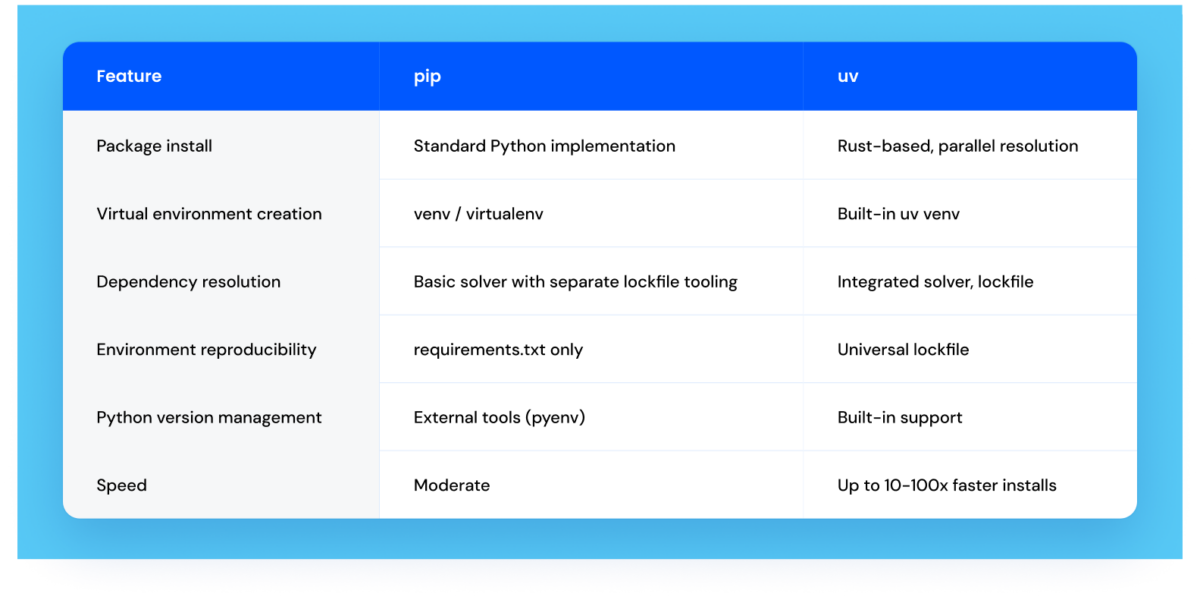
Because uv is written in Rust and handles multiple downloads and resolutions in parallel while using a global cache, installation workflows are significantly faster than standard pip operations.
Benchmarks report up to 10× faster installations compared to pip even without cache, and up to 100× faster when the global cache is warm, which is the most common scenario in day-to-day development, since dependencies rarely change between runs.
Unified toolchain
With uv, you don’t need to coordinate multiple CLI tools for environment setup, dependencies, and Python version control. A single interface simplifies both local development and CI/CD scripts.
Lockfiles and reproducibility
Unlike relying solely on a plain requirements.txt, uv produces a lockfile that records precise versions and metadata. This ensures consistent installs across machines and builds.
Installation and getting started
Installing uv
You can install uv using one of the following methods. Standalone installers are recommended for full functionality.
macOS / Linux:
Windows (PowerShell):
powershell -ExecutionPolicy ByPass -c "irm https://astral.sh/uv/install.ps1 | iex"Code language: JavaScript (javascript)Alternatively, install via pip or pipx:
pip install uv
# or
pipx install uvCode language: PHP (php)
Once installed, confirm the version:
uv --versionAt this point, you can start using uv in your Python projects.
How do you use uv in a Python project?
1. Initialize a project
Create a new project and initialize it with uv. This sets up a directory with basic config:
mkdir myproject && cd myproject
uv init
This creates:
- pyproject.toml – project configuration
- Lockfile – dependency snapshot
- Virtual environment defaults
2. Adding dependencies
To install runtime dependencies:
UV add requests FlaskFor development dependencies (e.g., for testing):
uv add --dev pytest pytest-covuv separates dev dependencies under the dev section in pyproject.toml, similar to other modern package managers.
3. Syncing dependencies
To install packages based on your lockfile:
uv syncThis ensures reproducible installs every time, unlike ad-hoc installs with pip install.
4. Running code
To run Python with the managed environment:
uv run python main.pyCode language: CSS (css)You can also run tools directly:
uv run pytestExample pyproject.toml
Below is an annotated sample configuration:
[project]
name = "myproject"
version = "0.1.0"
description = "Example project using uv"
authors = ["Your Name <you@example.com>"]
dependencies = [
    "requests>=2.28.0",
    "flask>=2.2.0",
]

[dependency-groups]
dev = [
    "pytest>=7.0.0",
    "pytest-cov",
    "ruff",
    "black",
]

[tool.uv]
python = ">=3.10"Code language: JavaScript (javascript)
Explanation:
- [project]: Standard metadata used for packaging and project identity.
- dependencies: Runtime packages installed via uv add ….
- optional-dependencies.dev: Development dependencies for testing and code quality (pytest, ruff, black). These are only installed in development contexts.
- [tool.uv]: uv-specific configuration, such as Python version constraints and lockfile location.
This structure ensures a clean separation between primary and dev dependencies while maintaining reproducibility via the lockfile.
Integrating testing and quality workflows
Once dependencies are installed, you can integrate standard workflows:
Linting:
uv run ruff .Formatting:
uv run black .Running tests:
uv run pytestThese commands run within the uv-managed environment, eliminating the need for separate virtualenv activation steps.
When should you use uv instead of pip?
Advantages of uv
- Performance: Faster installs and resolution.
- Unified CLI: Replace multiple tools with one.
- Reproducibility: Built-in lockfile guarantees consistent environments.
- Project scoping: Easier development scripting and tooling integration.
When pip still makes sense
- Existing production systems that assume pip as part of the system Python.
- Docker images where only pip is installed by default, and you need a minimal footprint.
- Maximum compatibility with older Python workflows.
In many modern development contexts, uv can streamline workflows without sacrificing compatibility with PyPI and requirements formats.
Summary
uv is an emerging Python package and project manager that unifies multiple tools into a single interface while delivering performance improvements and simplified workflows. It is both a drop-in replacement for pip workflows and a more capable project manager with lockfiles, environment control, and dev dependencies built in.
By adopting uv, teams can reduce tooling complexity and speed up local development and CI/CD pipelines. The integration with a pyproject.toml-centric workflow also aligns with modern Python packaging standards.